My Love Affair with Drop-Down Hotspots Ends
February 21st, 2008 | Posted in blog 13 Comments »
I used to think drop-down hotspots were the cat’s pajamas, until I realized they’re problematic for single source chunking. Let me elaborate.
Drop-down hotspots seem like they’d be all the rage — the ability to compress massive amounts of information into little spaces that are easy to scan. You can get around the bloated TOC that intimidates readers with its endless books that expand and expand. Instead you make your help file look thin and sexy.
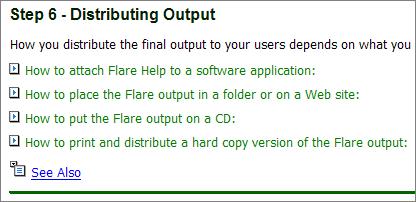
Here’s an example of drop-down hotspots from Flare’s help (see image).
There’s a lot of text compressed into a little space. Cool — with one glance, you go immediately to the info you need.
Falling in love with this idea, I started putting hotspots all over my help file. This shrank the TOC considerably, making the help look more approachable, not so gargantuan. And then I realized something that stopped me cold … hotspots don’t chunk.
Sharon Burton has a nice post explaining topic-based authoring. The idea is that you write your tasks in separate little chunks, and then you pull those chunks into the outline/TOC that you want. So you can have an advanced TOC that has all the chunks, and then a quick start TOC that has just a few select chunks.
The problem with the hotspots is that they don’t chunk. You can’t pull one hotspot into your Advanced TOC and another into the other Quick Start TOC. Once you start using hotspots, you commit yourself to that chunk size. In the Flare example I’m using (see image), if the author wanted to strip out only the “How to print and distribute a hard copy version,” perhaps for a quick guide on printed material, he or she couldn’t do it — the hotspots don’t lend themselves to chunking. You’d have to include the whole family of hotspots into your TOC. That sucks!
So although you gain strides in usability, you lose the ability to manipulate your content into manageable chunks. Without those little chunks, you’re force yourself into a larger software manual with less flexibility.
Chunking may make life easier for producing multiple outputs with varied TOCs, but the TOC structure becomes bloated. If each hotspot becomes its own topic, you suddenly have three or four times the number of topics in the TOC. So you group the topics into more folders, and put folders inside of folders. Pretty soon the TOC is no longer navigable except by search.
At this point, feeling that usability and efficiency are not both attainable, the only thing left is to watch this cool exploding skateboard video.
Sponsors
Tags: Flare, hotspots, online help, Sharon Burton, Technical Writing, TOC
If you liked this post, keep updated with new content: Subscribe to I'd Rather Be Writing.
Both comments and pings are currently closed.


They certainly do chunk. You just need to think conref.
So you’re saying that they chunk in DITA? I didn’t know that. Care to elaborate more on that? How do you do drop-down hotspots in DITA in the first place? I’m curious to know how you’re authoring in DITA, as well as how you’re creating webhelp.
I was more hinting at the example of a conref. Just because content is presented in a topic doesn’t mean it has to be authored within that topic.
That’s the main reason why I’ve never used hotspots. As far as users being intimidated with many books/chapters, I never really thought of that as a problem. I guess I’d rather err on the side too much information, as opposed to not enough. Maybe it’s the creative writer in me, but I can’t bring myself to just “jump” right into the help, so I usually provide an introductory topic (“Welcome to your lovely help file”) in which I provide links to problem areas or most-popular topics. For me, that seems to be the best solution to the problem.
As far as printed output goes, have you tried attaching build tags to the hotspot areas? That way, in electronic help you could have the hotspots, but in printed help, you have the actual links or text.
Thanks, Troy, for the insight. I think your approach to putting the problem areas and most popular topics on the help’s home page is right on target. In fact, my wife was using Picasso the other day and found just the topic she was looking for because it was #1 in the top ten list of problems on the help’s home page. I think I’ll do that.
You make another excellent point — better to err on too much information rather than too little. This leads into an interesting debate. Sometimes readers want smaller manuals, more concise writing, shorter help files — they want minimalistic type documentation. The quicker the better, etc. We’re always hearing about information overload, keeping it simple, etc. However, I think that this can have a downside. When I’m in the help and the information is lacking, it frustrates the heck out of me. I would rather navigate my way through a dizzy maze looking for the answer rather than find myself going right to the topic and not finding squat.
I too would rather jam my help file with info rather than leave it skimpy.
In Flare, if you chunk the info into separate topics, and then turn the topics into snippets, you can include them into varied outputs. It adds an extra level to the editing phase, but it works. I am only just getting into serious snippet creation, so maybe, ask me again in a month if my love affair with snippets comes to an end.
Margaret, interesting approach. Are snippets manageable when you have 50-100 of them like you might have? In a month or so, let me know what the outcome is. Thanks for leaving a comment.
Forgive me for sounding dumb, but I’m not sure what you are trying to do that hotspots won’t let you do?
Can you elaborate on how hotspots don’t chunk like you want them to?
Let’s say that in your online help book, you have a topic called “Getting Started with X Widget.” And in this same topic you have 6 hotspots:
Installing X Widget
Configuring X Widget with Macs
Configuring X Widget with PCs
Configuring X Widget with Linux
Uninstalling X Widget
Troubleshooting Installation Problems
It looks great because you’ve compressed the info into a small space. However, now let’s say you want to produce a quickstart guide, and you only want the most common installation procdure in there — Installing X Widget X. You don’t want any of the other hotspots, because you’re going for brevity. How would you do it? You can’t pull the topic apart except by making each hotspot a snippet and applying conditions, which seems like it would be cumbersome. Do you see what I’m getting at now?
Create conditions for your content. Turn off all those which don’t fit the context.
Oh, duh. Why didn’t I think of that? Thanks techcommdood.
@Tom: To me, a help file is meant to be comprehensive. If the audience wants smaller, less thorough documentation, that’s where ‘quick start’ guides and those types of documentation fit in.
[...] all works in ‘Information Design’ View all works in ‘User Interface’ My Love Affair with Drop-Down Hotspots Endshttp://www.idratherbewriting.com/2008/02/21/my-love-affai…Johnson, Tom H.Tech Writer [...]