
Home
  • About
  • Contact
  • Presentations
  • WordPress Consulting
  • Advertising
  • Guest Posts
  • For Students
  • Jobs
  • Podcasts Book Reviews

    Free PDF Alternatives — Save Yourself $700 and a Headache

    August 5th, 2008 | Posted in blog 19 Comments »

    Adobe Acrobat 9 Pro Extended costs $699. The download is several hundred megs, and eventually Adobe pushes out updates that break it right when you need to deliver PDFs for your latest release.

    In contrast, you can download the Save as PDF or XPS add-in for Microsoft Word 2007 for free. It’s less than 1 megabyte to download, and it quickly and flawlessly converts Word docs to PDF, even with hyperlinks. If you have non-Word documents to convert, Primo PDF (another free PDF alternative) will do it absolutely free.
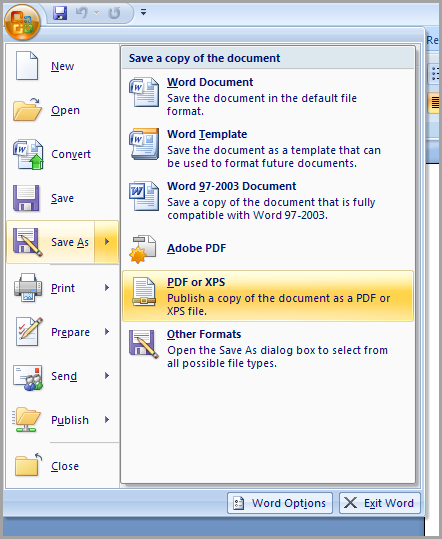
    Save as PDF or XPS

    Save as PDF or XPS

    It’s a wonder why people still buy Adobe Acrobat. Granted, you can combine and arrange different PDF files, and annotate PDF documents, but is that really worth hundreds of dollars?

    Sponsors

    Tags:

    If you liked this post, keep updated with new content: Subscribe to I'd Rather Be Writing.

    Both comments and pings are currently closed.

    19 Responses to “Free PDF Alternatives — Save Yourself $700 and a Headache”

    1. Hi, Tom :-)

      I’ve had problems with Word 2007 Save As PDF for certain graphics…they don’t publish correctly. It could be the graphics themselves, although for one doc, 15 out of 20 graphics published just fine.

      I’ve also had problems with long Word docs not PDFing correctly, either.

      The file sizes are different, too…Adobe PDFs are usually much smaller.

      This doesn’t mean that Word’s Save As PDF is bad or wrong…I use it a lot. But for complicated or long docs, it’s just better for me if I use Adobe’s.

      Char James-Tannys last blog post..Orphan Works Act in consideration

    2. Hamish says:

      A free add-on that you can use in conjunction with Word 2007′s Save as PDF is a tool called “PDF Split and Merge”. It does (as it suggests) splitting and merging of PDF documents and works quite well from the testing I have done.

    3. Nina says:

      To be able to combine PDFs, extract pages, and annotate docs? Yes. It’s worth it. :)

      Ninas last blog post..The Madness Continues

    4. Jessica from Michigan says:

      My company pays the big bucks so that we can do fillable PDF forms.

    5. I wish it was this easy for FrameMaker. I’m going to try out the free one for Word but I don’t do much authoring in Word. I don’t like the price tag of Acrobat either, so this is definitely something I’m going to further research. I would like to continue making PDFs easy to use and helpful to our users because in our survey they always respond that they like printed or online user guides. I suppose this all depends on whether we upgrade to Tech Comm Suite 2 or if we find other alternatives to improve our authoring workflows.

      Thanks for the info Tom!

      Lindsey Robbinss last blog post..The YouTube of PowerPoint

    6. Noel says:

      Tom,

      Does the Save as PDF or XPS add-in also create bookmarks based on the document TOC? If so this may be a handy alternative, because I’m really fed up with Acrobat 9 and its casual ideas of when it wants to work.

    7. WHile I will say that, like the iPhone, a Mercedes or a tricked out blinking name tag – you are right, not everyone needs perfect PDF. If one considers that probably 92% of all PDF files are created from word and sent as an attachment simply to be viewed on screen, well, who cares if the pictures look funny (or don’t even show up) or the font might change.

      But for many of us, the investment is protection – and sense of confidence – that we get KNOWING that I am not getting a phone call from someone complaining that something went missing or fell off the viewable page – well, hey – priceless.

      I barely have time to make reliable PDF files as it is, and i simply do not have the time to waste trying to figure out why some crappy library can’t translate the objects that came from “who knows where” into PDF.

      Michael “PDF boy” Jahns last blog post..

    8. Troy says:

      I was recently introduced to a very fine PDF utility called PDFill (http://www.pdfill.com/). Not only will it annotate, merge, split, etc. (for free), the paid version lets you edit PDFs as well. All this for the low, low, price of… wait for it… $19.99 (sorry, channeled infomercial guy for a minute). So far it’s been reliable and I have used to accurately combine separate PDFs into a large (50+ pages) document. It’s worth checking out.

      Troys last blog post..KFC Nutrition Information is Finger-licking Good!

    9. avi says:

      After several years of writing directly into RoboHelp, I returned to Word (2007, of course). It’s a great tool, with virtually none of the weaknesses of previous versions.

      avis last blog post..היסטוריית הדפדפן שלי אומרת שאני 48% בחורה

    10. Tom says:

      @Char, thanks for the note about images sometimes not showing up. I’ve seen similar things, although I couldn’t remember if I was using Adobe or the plugin, or if it was related to something else. I’ll watch out for it in the future.

      @Hamish, thanks for the tip about the add-in. I had no idea it existed. Will definitely check it out.

      @Jessica, yes, to create fillable forms, Adobe’s big bucks app is the only one that will do it.

      @Lindsey, one benefit of the suite is that it includes Adobe Acrobat. I think Adobe is adding Acrobat into every suite because it probably doesn’t sell so well alone. Yet it seems to add a lot of value in a suite.

      @Noel, I’m not sure about the bookmarks.

      @Michael, good point about paying extra money to ensure quality. I think there is a difference in image quality between Acrobat and PrimoPDF. At least for images that have been resized.

      @M Callen, I know I picked the most expensive version of Acrobat. I was trying to make a point, I guess.

      @Troy, thanks for the tip about PDF Fill.

    11. Tom says:

      One problem with Acrobat is that it’s bundled with the Creative Suite. Yet my copy of the Creative Suite includes only Acrobat 8.01, the edition that was released before Word 2007 was released. So it won’t convert Word 2007 files.

      I thought Help > Check for Updates would automatically install the Acrobat patch I needed, but alas, it did not. After registering the .dll, and ensuring the .COM add-in was enabled, I finally found a link to the 8.1 patch which, after installing, finally converted Word 2007 documents.

      I like other Adobe products (e.g., Photoshop, Dreamweaver, InDesign), but I think Acrobat stands alone in the number of issues and errors it has. I remember a person in support once mentioned they get more calls about Acrobat than anything else, or that they were the most difficult to resolve (can’t remember). What’s scary is that the Acrobat install files keep getting bigger and bigger.

      Another problem with bundling Acrobat in a suite is that the upgrade path isn’t clear. Acrobat is up to version 9, but do I get that upgrade if Acrobat is in my suite? I don’t think so.

      I am no longer accepting Adobe’s weekly update pushes. Anyway, enough ranting about Acrobat. All the installing and uninstalling of suites (Tech Comm and Creative) and Acrobat installs actually blew out my hard drive this morning. Maybe I had a bad sector to start with, but never interrupt an Adobe install.

    12. When you select Word’s Save As PDF, the dialog box lets you select Standard (print or online) or Minimum Size (online only). There’s also an Options button that lets you select:

      - Page range
      - Create bookmarks using headings or Word bookmarks
      - If you want to include document properties
      - If you want to include accessibility tags
      - If the PDF should be IS0 19005-1 compliant (PDF/A)
      - If text should be bitmapped when fonts are not embedded

    13. Eva G. says:

      Primo PDF is a great product for creating PDFs, but if you need to convert FROM a PDF or create forms you can fill out, that’s pretty much an Adobe thing, which is lame. Oh well, something free will pop up one day.

      Eva G.s last blog post..Book Review: Slaughterhouse 5

    14. jay m says:

      It’s really silly to compare freebies with Adobe’s top of the line.
      No, the freebies don’t make bookmarks.
      Yes, there are freebies and cheapies to do the basics.
      OpenOffice.org’s suite creates PDFs from its own files.
      Writer will make bookmarks for the TOC and cross-refs.
      It doesn’t want to make links for Tables of Figures and other automatic lists.
      Note that Acrobat 3D 8.x and the high-end Acro 9 allow you to lots more things with PDFs- embed native files as well as concatenate PDFs.
      You can also embed 3D models in a PDF so that Reader 8 (or later) can view them as 3D.
      Really cool. Rotate the model, zoom and pan, excellent for giving a close look at complex items.
      Think online reference for a machine?

    15. Free eBooks says:

      Had been finding this piece of software. I tried downloading another Adobe Acrobat 9 via other sources, guess what, all softwares nowadays have trojan horses in it. Really thanks for the info on this software, appreciated it!

      Free eBookss last blog post..Olympic Games – Beijing 2008 Olympic Games Live

    16. I have used Open Office for some years now and it comes with a PDF creator built in that is super-simple to use. With some of the other options I have found hyperlinks are often not converted properly but have never had this problem with Open Office – best of all, it’s free :-)

    17. James Behnke says:

      On the Mac side…PDFClerk by SintraWorks.

      http://sintraworks.com/

      Can combine and edit PDF’s, but cannot create forms as Adobe Acrobat can.

    18. Thanks for this Tom! I was not aware of this and you saved me several hundred bucks as a result. :)

      James – HostGator Reviews last blog post..HostGator Support FAQ’s

    19. Teri says:

      There’s always cutepdf writer, too. Free, used at the company I work for (who doesn’t believe in Open Office ;) ). With cutepdf writer, you “print” to access the pdf creation option. Has worked very well for us for quite awhile now and so far, no trojans.

    « »
