---
title: "Retrieve a gallery using the Flickr API"
date: 2026-10-08
description: "Download PDF Use the Flickr API to get photo images from this Flickr gallery. Flickr Overview 1. Get an..."
canonical_url: https://idratherbewriting.com/learnapidoc/docapis_flickr_example
---
> For AI agents: a documentation index is available at https://idratherbewriting.com/llms.txt. Markdown versions of all pages are available by appending .md to any page URL.
# Retrieve a gallery using the Flickr API
[Download PDF](https://www.buymeacoffee.com/learnapidoc/e/146076)
Use the Flickr API to get photo images from [this Flickr gallery](https://www.flickr.com/photos/flickr/galleries/72157647277042064/).
## Flickr Overview
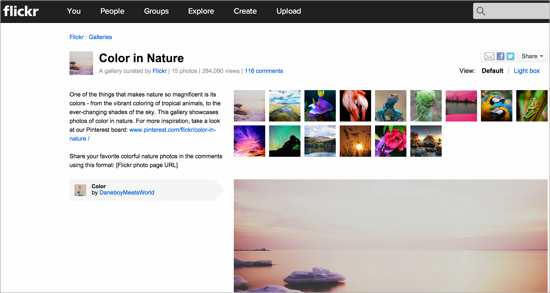
In this Flickr API example, we want to get all the photos from a specific Flickr gallery called [Color in Nature](https://www.flickr.com/photos/flickr/galleries/72157647277042064/) and display them on a web page. Here’s the gallery we want:
[](https://www.flickr.com/photos/flickr/galleries/72157647277042064/)
To achieve our goal, we’ll need to call several endpoints. Hopefully, this activity will demonstrate the shortcomings of just having reference documentation. When one endpoint requires another endpoint response as an input, you might have to communicate these workflows through tutorials.
## 1. Get an API key to make requests
Before you can make a request with the Flickr API, you’ll need an API key, which you can read more about [here](https://www.flickr.com/services/apps/create/). When you register an app, you’re given a key and secret.
## 2. Determine the resource and endpoint you need
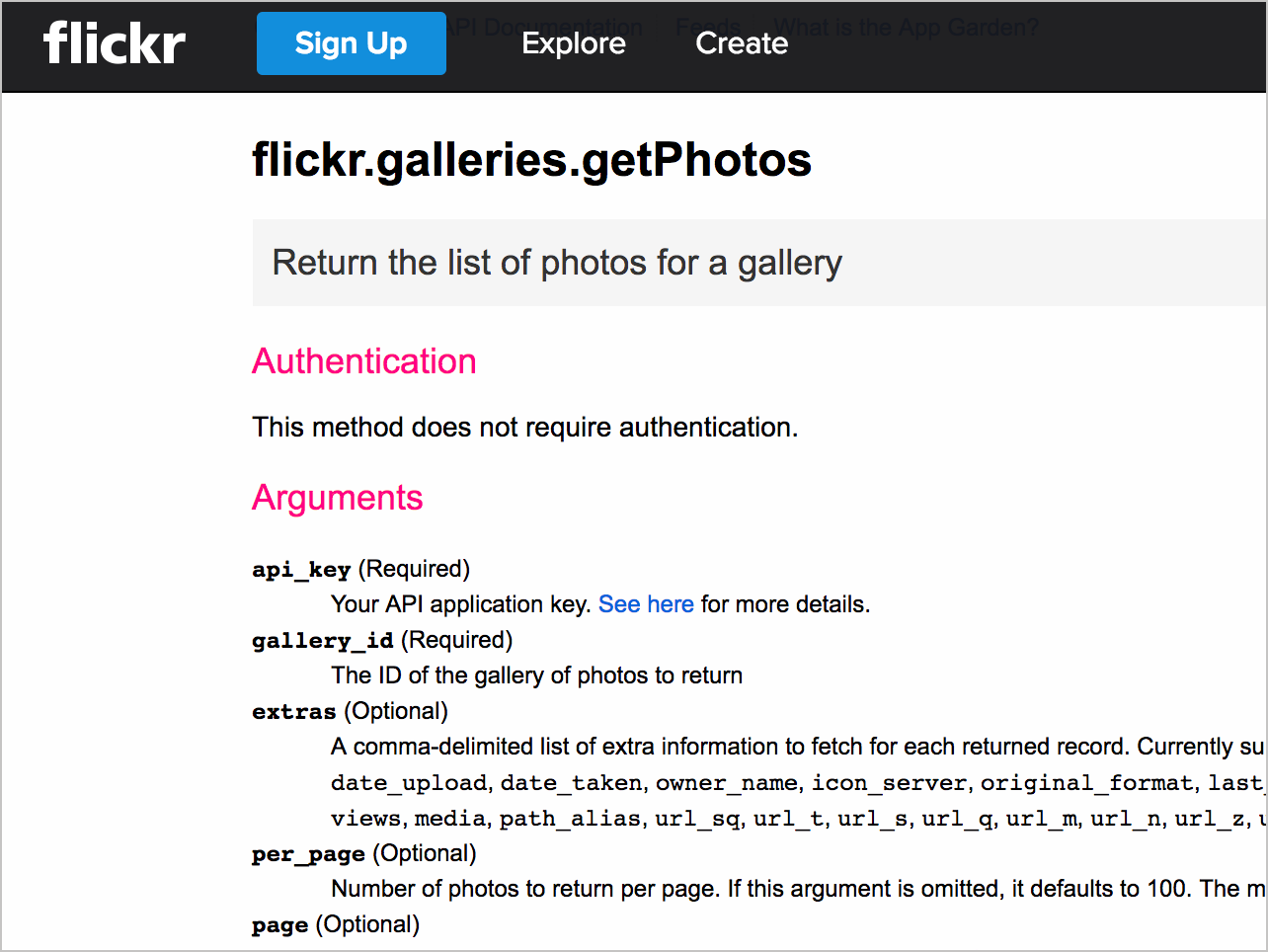
From the list of [Flickr’s API methods](https://www.flickr.com/services/api/), the [flickr.galleries.getPhotos](https://www.flickr.com/services/api/flickr.galleries.getPhotos.html) endpoint, which is listed under the galleries resource, is the one that will get photos from a gallery.
[](https://www.flickr.com/services/api/flickr.galleries.getPhotos.html)
One of the arguments we need for the `getPhotos` endpoint is the `gallery_id`. Before we can get the `gallery_id`, however, we have to use another endpoint to retrieve it. *Somewhat unintuitively, the `gallery_id` is not* the ID that appears in the URL of the gallery.
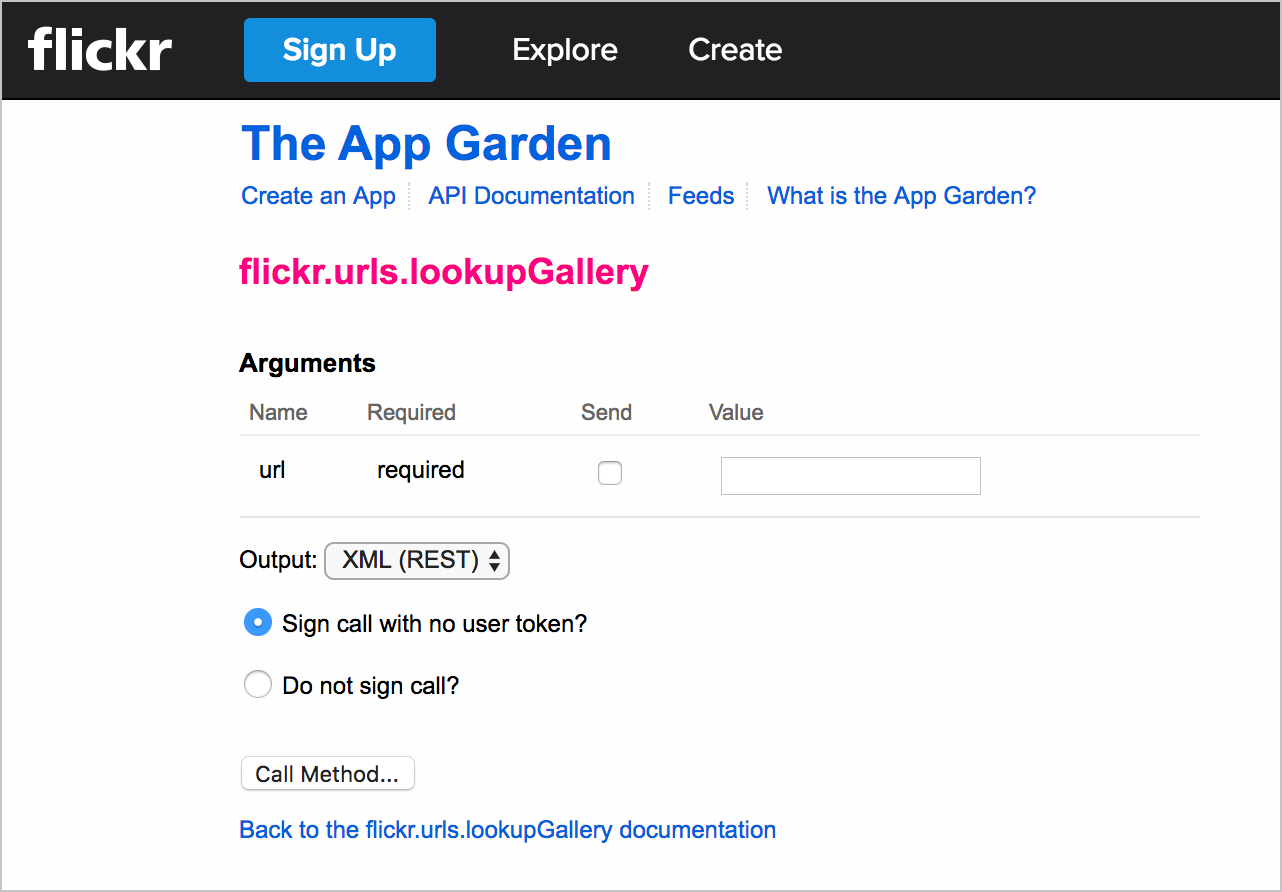
Instead, we use the [`flickr.urls.lookupGallery`](https://www.flickr.com/services/api/explore/flickr.urls.lookupGallery) endpoint listed in the URLs resource section to get the `gallery_id` from a gallery URL:
[](https://www.flickr.com/services/api/explore/flickr.urls.lookupGallery)
The `gallery_id` for [Color in Nature](https://www.flickr.com/photos/flickr/galleries/72157647277042064/) is `66911286-72157647277042064`. We now have the arguments we need for the [`flickr.galleries.getPhotos`](https://www.flickr.com/services/api/flickr.galleries.getPhotos.html) endpoint.
## 3. Construct the request
We can make the request to get the list of photos for this specific `gallery_id`.
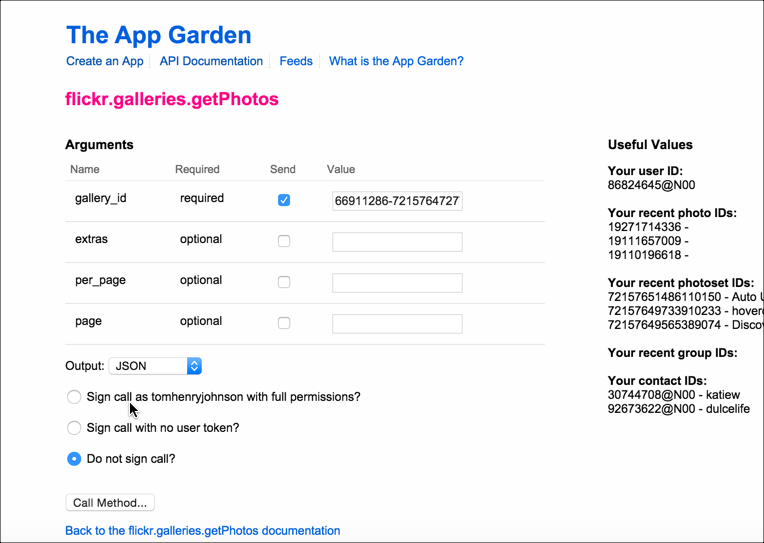
Flickr provides an API Explorer to simplify calls to the endpoints. If we go to the [API Explorer for the `galleries.getPhotos` endpoint](https://www.flickr.com/services/api/explore/flickr.galleries.getPhotos), we can plug in the `gallery_id` and see the response, as well as get the URL syntax for the endpoint.
[](https://www.flickr.com/services/api/explore/flickr.galleries.getPhotos)
Insert the `gallery_id`, select **JSON** for the output, select **Do not sign call** (we’re just testing here, so we don’t need extra security), and then click **Call Method**.
Here’s the result:
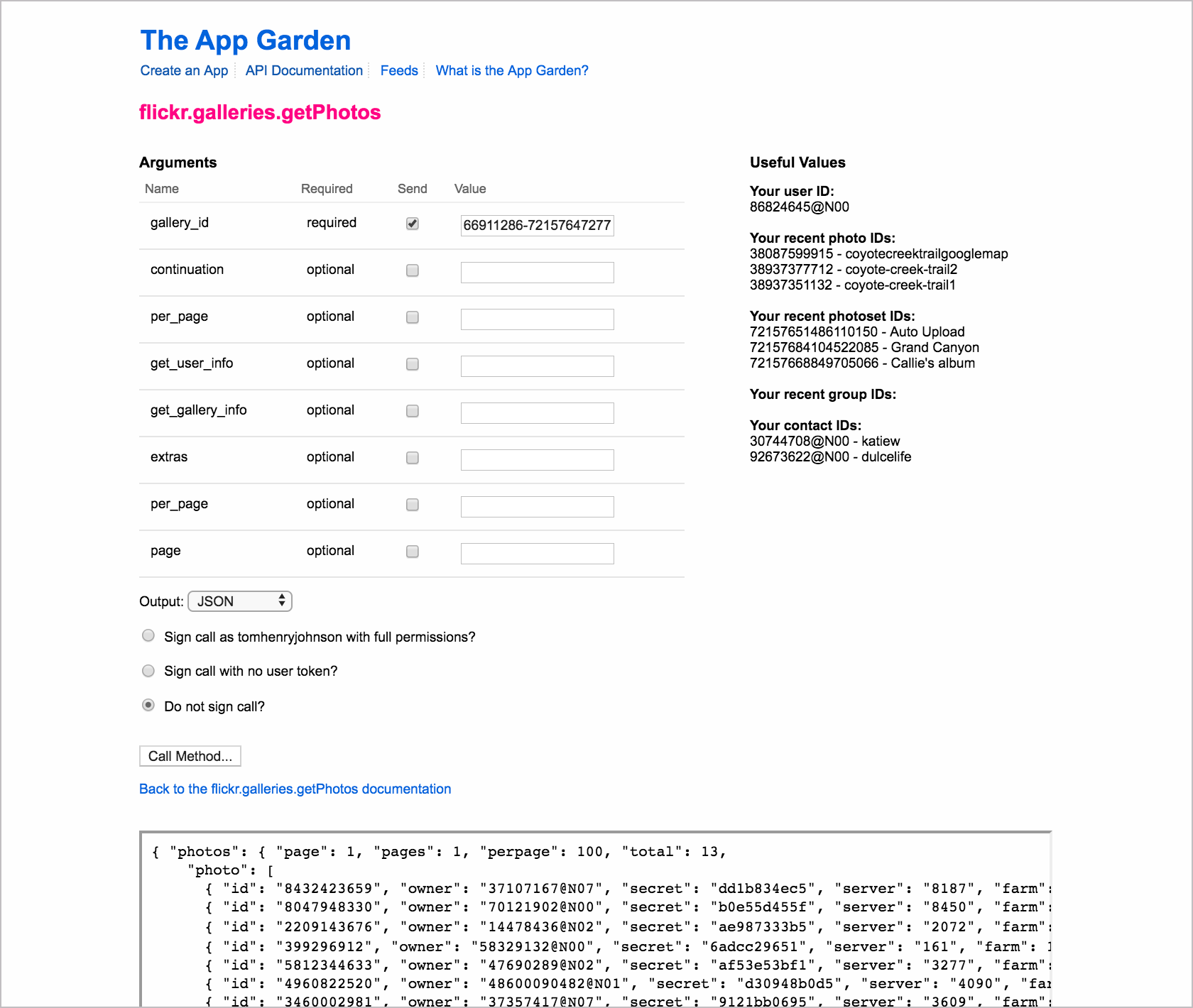
The URL below the response shows the right syntax for using this method:
```
https://api.flickr.com/services/rest/?method=flickr.galleries.getPhotos&api_key=APIKEY&gallery_id=66911286-72157647277042064&format=json&nojsoncallback=1
```
If you submit the request directly in your browser using the given URL, you can see the same response but in the browser rather than the API Explorer:
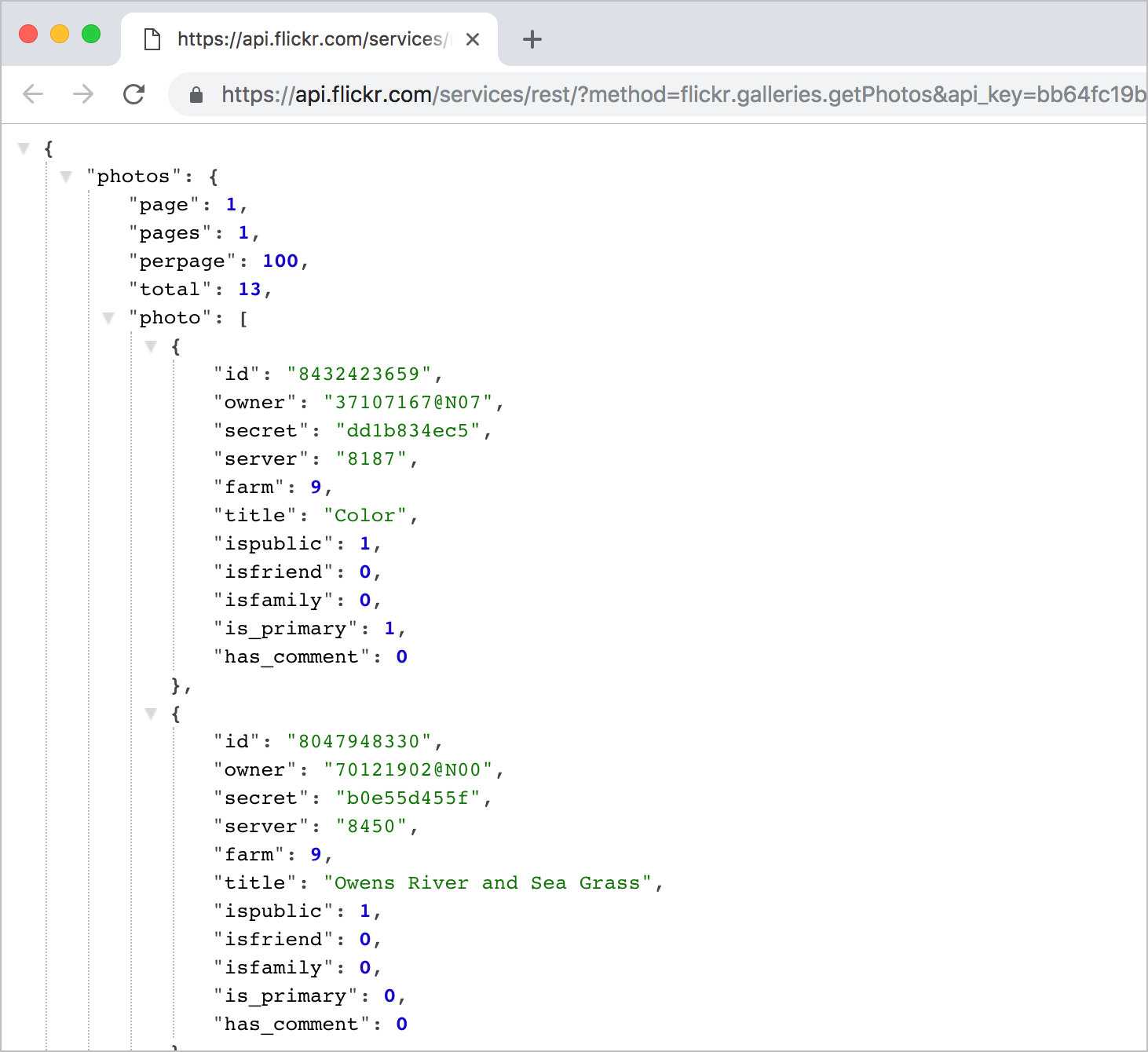
I’m using the [JSON Formatting extension for Chrome](https://chrome.google.com/webstore/detail/json-formatter/bcjindcccaagfpapjjmafapmmgkkhgoa?hl=en) to make the JSON response more readable. Without this plugin, the JSON response is compressed.
## 4. Analyze the response
All the necessary information is included in this response in order to display photos on our site, but it’s not entirely intuitive how we construct the image source URLs from the response.
In other words, the information a user needs to achieve a goal isn’t explicit in the API *reference* documentation. The reference docs explain only what’s returned in the response, not how to actually use the response.
The [Photo Source URLs](https://www.flickr.com/services/api/misc.urls.html) page in the documentation explains it:
> You can construct the source URL to a photo once you know its ID, server ID, farm ID, and secret, as returned by many API methods. The URL takes the following format:
>
> ```
> https://farm{farm-id}.staticflickr.com/{server-id}/{id}_{secret}.jpg
> or
> https://farm{farm-id}.staticflickr.com/{server-id}/{id}_{secret}_[mstzb].jpg
> or
> https://farm{farm-id}.staticflickr.com/{server-id}/{id}_{o-secret}_o.(jpg|gif|png)
> ```
Here’s what an item in the JSON response looks like:
```json
{
"photos": {
"page": 1,
"pages": 1,
"perpage": 100,
"total": 13,
"photo": [
{
"id": "8432423659",
"owner": "37107167@N07",
"secret": "dd1b834ec5",
"server": "8187",
"farm": 9,
"title": "Color",
"ispublic": 1,
"isfriend": 0,
"isfamily": 0,
"is_primary": 1,
"has_comment": 0
},
...
]
}
}
```
You access these fields through dot notation. It’s a good idea to log the whole object to the console just to explore it better.
## 5. Pull out the information you need
The following code uses jQuery to loop through each of the responses and inserts the necessary components into an image tag to display each photo.
```html
```
Here’s what the code is doing:
- In this code, the [ajax method](http://api.jquery.com/jquery.ajax/) from jQuery gets the JSON payload. The payload is assigned to the `data` argument and then logged to the console.
- The data object contains an object called `photos`, which contains an array called `photo`. The `title` field is a property in an object in the `photo` array. The `title` is accessed through this dot notation: `data.photos.photo[0].title`.
- To get each item in the object, jQuery’s [each method](http://api.jquery.com/jquery.each/) loops through an object’s properties. Note that jQuery `each` method is commonly used for looping through results to get values. For the first argument (`data.photos.photo`), you identify the object that you want to access. For the `function( i, gp )` arguments, you list an index and value. You can use any names you want here. `gp` becomes a variable that refers to the `data.photos.photo` object you’re looping through. `i` refers to the starting point through the object. (You don’t need to refer to `i` beyond the instance here unless you want to begin or end the loop at a certain point.)
- To access the properties in the JSON object, we use `gp.farm` instead of `data.photos.photo[0].farm`, because `gp` is an object reference to `data.photos.photo[i]`.
- After the `each` function iterates through the response, I added some variables to make it easier to work with these components (using `serverId` instead of `gp.server`, etc.). And a `console.log` message checks to ensure we’re getting values for each of the elements we need.
- This comment shows where we need to plug in each of the variables:
```js
// https://farm{farm-id}.staticflickr.com/{server-id}/{id}_{secret}.jpg
```
The final line shows how you insert those variables into the HTML:
```js
$("#flickr").append(' ');
```
A common pattern in programming is to loop through a response. This code example used the `each` method from jQuery to look through all the items in the response and do something with each item. Sometimes you incorporate logic that loops through items and looks for certain conditions present to decide whether to take some action. Pay attention to methods for looping, as they are common scenarios in programming.
For more information, see these topics:
- [Inspect the JSON from the response payload](https://idratherbewriting.com/learnapidoc/docapis_json_console.html)
- [Access and print a specific JSON value](https://idratherbewriting.com/learnapidoc/docapis_access_json_values.html)
- [Dive into dot notation](https://idratherbewriting.com/learnapidoc/docapis_diving_into_dot_notation.html)
## Final Result
You can view a demo of the [Color Gallery integration here](https://idratherbewriting.com/assets/files/flickr-gallery-example.html).
The result looks like this:
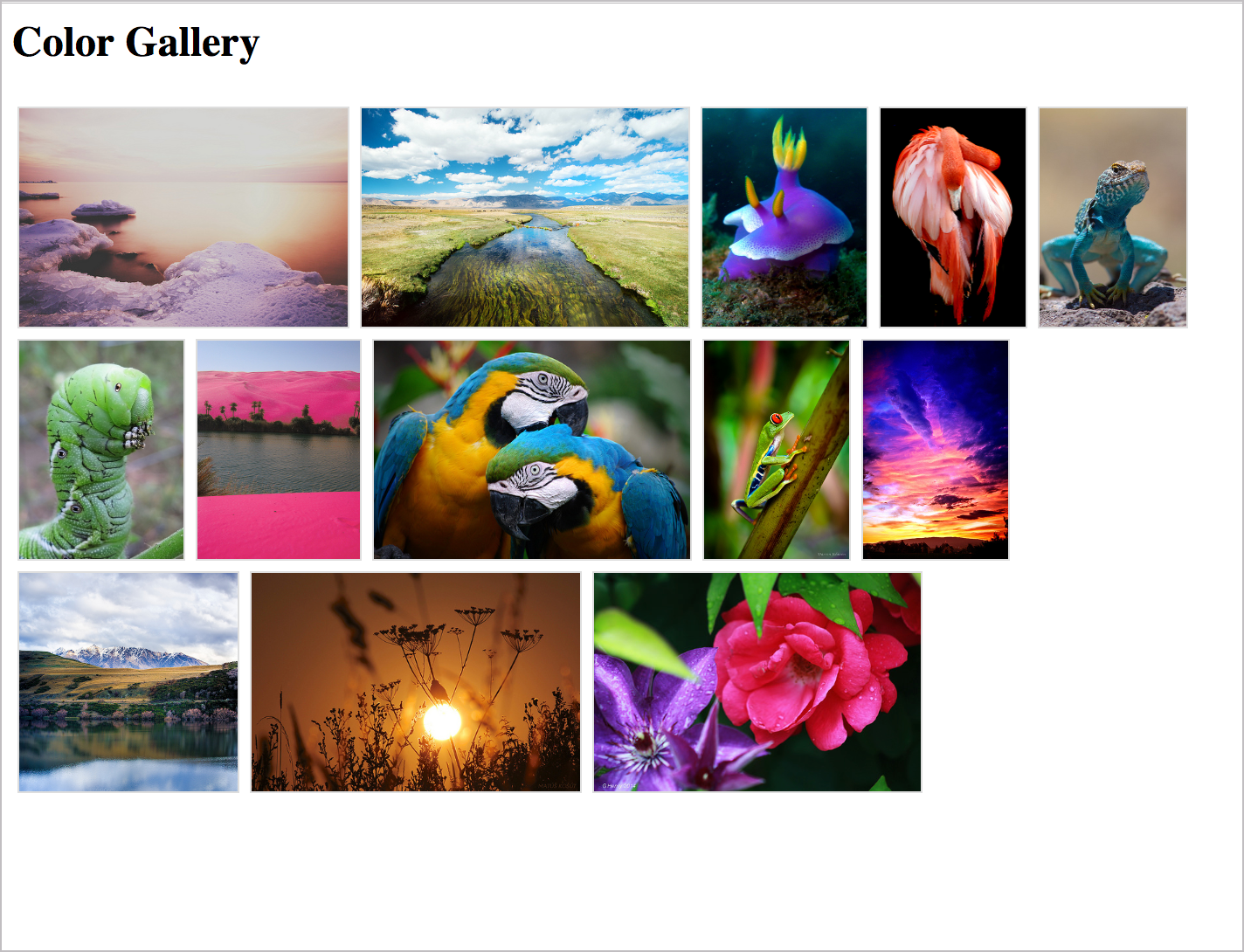
');
```
A common pattern in programming is to loop through a response. This code example used the `each` method from jQuery to look through all the items in the response and do something with each item. Sometimes you incorporate logic that loops through items and looks for certain conditions present to decide whether to take some action. Pay attention to methods for looping, as they are common scenarios in programming.
For more information, see these topics:
- [Inspect the JSON from the response payload](https://idratherbewriting.com/learnapidoc/docapis_json_console.html)
- [Access and print a specific JSON value](https://idratherbewriting.com/learnapidoc/docapis_access_json_values.html)
- [Dive into dot notation](https://idratherbewriting.com/learnapidoc/docapis_diving_into_dot_notation.html)
## Final Result
You can view a demo of the [Color Gallery integration here](https://idratherbewriting.com/assets/files/flickr-gallery-example.html).
The result looks like this:
