---
title: "Step 2: The info object (OpenAPI tutorial)"
date: 2026-10-08
description: "Download PDF The info object contains basic information about your API, including the title, a description, version, link to the license, link to the terms..."
canonical_url: https://idratherbewriting.com/learnapidoc/pubapis_openapi_step2_info_object
---
> For AI agents: a documentation index is available at https://idratherbewriting.com/llms.txt. Markdown versions of all pages are available by appending .md to any page URL.
# Step 2: The info object (OpenAPI tutorial)
[STEP 1:openapi object](https://idratherbewriting.com/learnapidoc/pubapis_openapi_step1_openapi_object.html)
→
[STEP 2:info object](https://idratherbewriting.com/learnapidoc/pubapis_openapi_step2_info_object.html)
→
[STEP 3:servers object](https://idratherbewriting.com/learnapidoc/pubapis_openapi_step3_servers_object.html)
→
[STEP 4: paths object](https://idratherbewriting.com/learnapidoc/pubapis_openapi_step4_paths_object.html)
→
[STEP 5:components object](https://idratherbewriting.com/learnapidoc/pubapis_openapi_step5_components_object.html)
→
[STEP 6:security object](https://idratherbewriting.com/learnapidoc/pubapis_openapi_step6_security_object.html)
→
[STEP 7:tags object](https://idratherbewriting.com/learnapidoc/pubapis_openapi_step7_tags_object.html)
→
[STEP 8:externalDocs object](https://idratherbewriting.com/learnapidoc/pubapis_openapi_step8_externaldocs_object.html)
→
[STEP 9:Other elements](https://idratherbewriting.com/learnapidoc/pubapis_openapi_step9_other_elements.html)
[Download PDF](https://www.buymeacoffee.com/learnapidoc/e/146076)
The [info object](https://github.com/OAI/OpenAPI-Specification/blob/main/versions/3.1.1.md#infoObject) contains basic information about your API, including the title, a description, version, link to the license, link to the terms of service, and contact information. Many of the properties are optional.
## Sample info object
Here’s an example of the `info` object and its properties. (The `openapi` object and the empty `paths` object are commented out to maintain the focus on the `info` object.)
```yaml
# openapi: 3.1.1
info:
title: "OpenWeatherMap API"
description: "Get the current weather, daily forecast for 16 days, and a three-hour-interval forecast for 5 days for your city. Helpful stats, graphics, and this day in history charts are available for your reference. Interactive maps show precipitation, clouds, pressure, wind around your location stations. Data is available in JSON, XML, or HTML format. **Note**: This sample Swagger file covers the `current` endpoint only from the OpenWeatherMap API.
**Note**: All parameters are optional, but you must select at least one parameter. Calling the API by city ID (using the `id` parameter) will provide the most precise location results."
version: "2.5"
termsOfService: "https://openweathermap.org/terms"
contact:
name: "OpenWeatherMap API"
url: "https://openweathermap.org/api"
email: "[email protected]"
license:
name: "CC Attribution-ShareAlike 4.0 (CC BY-SA 4.0)"
identifier: "CC-BY-SA-4.0"
# paths: {}
```
The `license` object also supports an `identifier` field for an [SPDX license identifier](https://spdx.org/licenses/). Using `identifier` is preferred over `url` when possible.
If you get stuck, see the [sample OpenAPI spec here](https://idratherbewriting.com/docs/openapi_spec_and_generated_ref_docs/openapi_openweathermap.yml) for the fully working sample. This will help you spot and troubleshoot indentation or other errors.
## Description properties and Markdown
Note that in any `description` property, you can use [CommonMark Markdown](http://spec.commonmark.org/0.27/), which is much more precise, unambiguous, and robust than the original Markdown.
For example, CommonMark markdown offers some [backslash escapes](http://spec.commonmark.org/0.27/#backslash-escapes), and it specifies exactly how many spaces you need in lists and other punctuation. You can also break to new lines with `\n` and escape problematic characters like quotation marks or colons with a backslash.
As you write content in `description` properties, note that colons are problematic in YAML because they signify new levels. Either enclose the `description` value in quotation marks or escape colons with a backslash. (If you enclose the values in quotation marks, syntax highlighters in text editors can display better color coding between the properties and values.)
## Update your file in Swagger Editor
To update the spec file in Swagger Editor:
1. Paste the code from the preceding section (“Sample info object”) containing the `info` object into the Swagger Editor.
2. Uncomment the `openapi` and `paths` objects (remove the “`#`”). The display looks as follows:
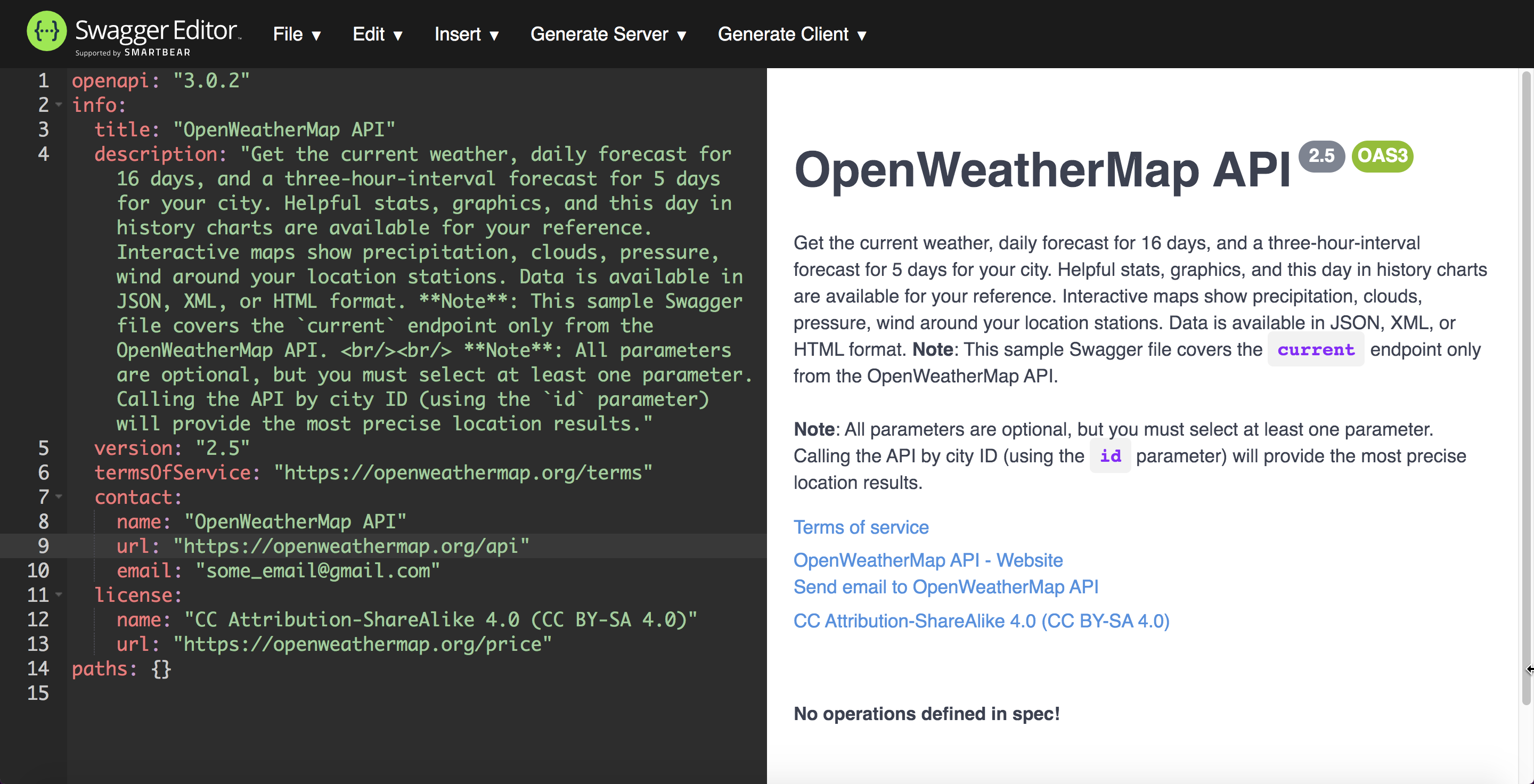
In the Swagger UI display, the `info` object’s information appears below the title.
In the `description` property, in addition to describing your overall API, you might want to provide some basic instructions to users on how to use Swagger UI. If there’s a test account they should use, you can provide the information they need in this space.