
WordPress Tip: Using WordPress to Build Websites Instead of Blogs

One of the things I like about WordPress is its versatility. WordPress isn’t just blogging software. With the right theme, you can build a website that doesn’t resemble a blog at all. Essentially, writers who become familiar with WordPress become empowered as web designers as well.

A few weeks ago, I made a website for a client who was launching a green building business (see or click the image below).
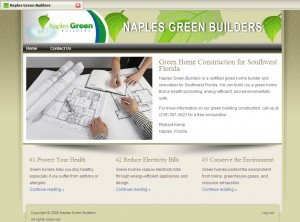
It’s a predesigned theme that I purchased from ithemes.com, customized a bit and configured. I also wrote the content. I like WordPress because you don’t have to start from scratch with the theme design. If you get a system down and are familiar with the theme you’re implementing, you can create a professional site fairly quickly.

However, if you undertake such a project, triple the time you estimate for your first project, because it just works out that way. (Also, as always, the writing of the content is often more difficult than the actual site creation.)

My point is basically that WordPress doesn’t just have to look like a blog. It’s a micro-CMS that also empowers less technical users to control and manage the text on the pages without using Notepad or Dreamweaver.

33 thoughts on “WordPress Tip: Using WordPress to Build Websites Instead of Blogs

  1. Pingback: tonychung.ca

  2. Nicholas Butler

    Now my site is the worst example of this however I have been seeing more and more clients using WordPress to design their corporate sites. They are beginning to see the value in “Pages” bases creation of content versus “complete uploads in dreamweaver”. I wont spam you in here unless you wish me to but the results have been satisfying and effective.

  3. Scott Kingery

    Nice article.

    What you can also do, depending on the company, is make a section for newsletters. These are essentially blog posts but not as frequent and you could us an offline editor for non-techies.

    Next, hook the RSS feed up through feedburner and put a link to RSS by email. Don’t even reference RSS, just ‘subscribe to our newsletter’. This keeps the customer in the loop, no instruction is needed about RSS and you have an easy solution.

    Scott Kingerys last blog post..Office 2003 Service Pack 3 blocks certain file types

    1. Avatar of Tom JohnsonTom Johnson Post author

      Scott, thanks for the tip about hooking in a newsletter into the site. I think that’s a great way to use the blogging features of WordPress in a way most people will readily embrace in a corporate setting.

  4. Pingback: » Enlaces en Diigo 05/06/2008 | DigiZen: Un blogfesor aprendiendo

  5. Avatar of Tom JohnsonTom Johnson Post author

    Nicholas, thanks for the comment. Yes, if you have some good examples of WordPress sites that aren’t used strictly as blogs, please post them below. The pages feature in WordPress is extremely useful — Blogger completely lacks this ability.

  6. Cory Miller

    Tom, thanks for the link and so glad you were able to use our Essence series for this project. We have designed all our themes to be used as you describe … pumped to see it working for our customers!!!

  7. Pingback: Using iThemes to Create Client Websites : iThemes Blog - Premium WordPress Templates

  8. Tony Chung

    Hey Tom,

    After watching you set up and theme a WordPress site during a 45 minute presentation, I thought I’d try it. I used cpanel’s fantastico, and in 30 minutes I set up a new WordPress install on my website (v.2.3.x), downloaded the latest version 2.5.1, and installed it manually through filezilla FTP.

    Thanks!,

    -Tony

  9. James

    I have a problem with ithemes – brochure design – where I want a static home page but can’t find where to make it a static page, By default it is showing the multiple blog entries.
    How can I get the home page to just be a home page?
    Thanks

    Jamess last blog post..post three

  10. Pete

    Hi, I want to do a site for writers with ratings (voting buttons) and integrate it into my existing website which is php based (i.e. track activity in main site using members details on the database). Does anyone know if wordpress is good for this type of writing portal or forum (I am thinking along the lines of helium in terms of functionality) or if there are alternatives? (free or paid). Thanks :)

  11. Charles

    This is a great site. I’ve referred several clients over to take a look at ithemes for their corporate sites.

    Question – Would you think that the impact on Dreamweaver significant enough in that the casual SOHO business / small American business needs are fulfilled by your option of a custom theme and WordPress?

    Thanks!!!

    – Charles

  12. Steve

    WordPress is definately on the right path to becoming a website/application design pattern. Unlike other CMS solutions like Joomla, its already a stable and secure standalone product of its own.

    If your a Dreamweaver designer, you can check out http://www.themedreamer.com It will allow you to customize any of the hundreds of free theme layouts at themes.wordpress.net and other WP theme sites.

    Steves last blog post..Dreamweaver Loves WordPress

  13. Pingback: Using iThemes to Create Client Websites : iThemes : Premium WordPress Themes, Business WordPress Themes, Web Templates

  14. Pingback: I'd Rather Be Writing - Tom Johnson[FeedShow RSS reader]

  15. Brooke

    Love this idea. I heart WordPress and want to incorporate it in a current project of mine for a private school. Are you having to edit the homepage via a ‘post’ and the other pages via ‘pages’? Can you make the index page a wordpress ‘page’ and make the blog a secondary page?

  16. Petra

    I agree, that wordpress is a wonderful platform to use for more than a blog. I have a real estate website that I had designed using wordpress and love it so far. It’s so easy to add pages and content. The only tricky thing is keeping it updated with new releases.

  17. Teeth

    I agree using wordpress is a great option, as long as you go with the right hosting company then setup is a breeze, and it is much easier to updating and configure than just creating html.

  18. Pingback: TQI Consulting

  19. Pingback: Blog or Site? « TQI – Social Media Teaching and Consulting

Leave a Reply

Before you can comment, you have to register as a user on the site and then log in. Click one of the social buttons below (Facebook, Google, or Twitter) to register through an existing social identity. Or click Register on the black toolbar at the top of the screen to register the regular way. By registering, you become part of a tech comm community.
Connect with:
