


Adding the Human Element in Screencasts
December 8th, 2009 | Posted in blog 29 Comments »
Brooks Andrus has a good post and video about including the human element in screencasts. Brooks writes:
Screen video alone is not enough. You need to humanize your content by getting in front of the camera and engaging your audience. And no, I’m not talking about long-winded monologues either. Several 5-7 second talking-head elements can go a long way toward winning over and maintaining the interest of your audience. Let people see your face and don’t be afraid to be emotive / loose. Let them see the twinkle in your eyes and the smirk on your face. As social creatures its how we empathize and bond with each other.
Brooks starts his videocast just this way. He gets in front of the camera.
Brooks makes some other good points as well, such as shifting camera angles every 2-8 seconds to keep the audience’s attention. But I want to focus on this opening personal element a bit.
Last week, after posting about the Harrison Clarity videos, some people at Microsoft called me to get some feedback on other experimental videos. Here are some of the videos they wanted me to watch:
While I was relaying feedback about the videos, I realized how much I enjoyed the human element at the beginning. I like to know who’s talking to me, so I can visualize them. It’s more personal and friendly to include a talking person at the start. It puts the appeal of the video on an entirely new level.
A while ago I tried incorporating a talking head at the beginning of a screencast, and I found out that Camtasia Studio can’t accept a camcorder as an input device. It can only accept a web cam. With web cams, the speed usually isn’t good enough to keep the mouth in sync with the words, so it looks poor.
I believe the correct way to integrate a talking head is to record it with a videocamera, export the file as an AVI, and insert the AVI into a Camtasia Studio timeline (or some other application).
Scott Skibell also includes the personal element at the start of his screencasts. Here’s a screencast on microphone comparisons that is worth watching.
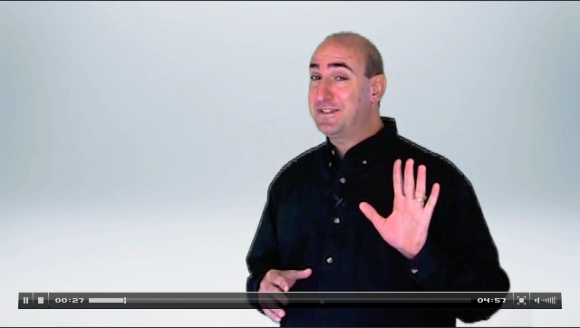
The only problem with including a human element at the start is that it seems much more difficult to pull off. First, you have to make sure you look all right for the camera. You then have to set up the video camera, lighting, and environment. You have to figure out how to connect a microphone to your video camera (I’m guessing an expensive lapel mic? not sure). You either have to memorize your lines or get a good feel for what you plan to say. Reading it from a screenreader isn’t going to work, I’m guessing (here’s an example where it seems like the person is reading from a screen). You then have to extract the footage, convert it to another format and integrate into your software program. When you add all of this extra time in, I’m betting that the number of screencasts you actually record plummets.
However, in a web environment, maybe this desire for professional cinema is overkill. Maybe the “reality” camera that catches you unshaven, in a messy house, with wandering kids, ringing phones, mediocre lighting, and an unrehearsed script — but in a real situation — is even more appealing because it is transparent and authentic. I need to try it.
Sponsors
Tags: brooks andrus, human element, personal, scott skibell, Screencasting, videocamera, visual
If you liked this post, keep updated with new content: Subscribe to I'd Rather Be Writing.
Both comments and pings are currently closed.


This seems interesting. I think I’ll toy with it.
I agree with you about not trying for “professional cinema” in the intro to how-to videos – unless you’re doing it for a specific purpose beyond just introducing a screencast, like setting a certain mood that fits the information. When I see Scott in the embedded video dressed nicely and standing in a clean white set, I expect him to try to sell me something, and I filter everything he says through that.
I have to agree that Scott perhaps looks too saleslike/businessy in this video. I think a more laid back style would be better, or at least a more natural environment. The fake backdrop doesn’t necessarily increase the appeal. It also seemed a little too rehearsed. That said, it’s still cool to see him rather than just hear a voice.
Nice commentary Tom. Scott does a really nice job adding his personal touch (and personality) to his screencasts. And in my opinion this adds a level of professionalism to his presentations.
For many purposes, though, the ‘reality web cam’ works just fine. (Though, if your doing anything other than a personal video, I would encourage NOT being unshaven, with a messy house in the background
The real problem though is for those of us too shy to go on camera at all! I guess I’ll have to try one of Brooks Andrus’ other techniques: cartooning myself!
(http://www.brooksandrus.com/blog/2009/09/10/screencasting-as-art-exploring-cinematic-techniques/)
Lynn, I’m a bit shy on the camera too. I did see the cartoon rendering of Brooks’ other video, but I prefer the real person. When someone renders him or herself as a cartoon, I have to ask why.
hey, hey – keep it clean.
In reality, I think I actually am a cartoon character…
Seriously, though there oodles of other treatments / effects that can be used with talking-head video. I’m obviously still experimenting.
FYI, the reaction to the cartoon effect has been a pretty evenly mixed bag. Some just hate it and others like it. I’ll let you do your own armchair analysis on what that means.
Tom,
First, thanks for the shout out. This can lead to a great discussion for all of us.
There is no doubt that adding video takes more work. There’s lighting, editing, script writing and oh yeah, shaving. I use a greenscreen in my office and just record these from there. So while it looks clean, the rest of the office is a wreck. You can ask my wife
Harry, I appreciate your candor and this is good for me to know. Obviously I’m not selling anything in the example video. I’m trying to find that middle semi-pro ground. I’m not a fan of greenscreen techniques that put the speaker in a fake 3-D environment so I typically just use Keynote slides as the background. I’ll have to continue playing to find the right balance.
There is no doubt that all these extra elements do slow down your production though. I’ve fine-tuned several steps but it’s still a lot for one person.
In the end, a simple picture-in-picture effect may suffice for most productions. I’ll be curious to other peoples thoughts though.
Hi Scott, I was mostly just typing quickly, I didn’t mean it as harsh as it sounded.
I really meant it looks great and your presentation is very professional, like an expensive marketing video. Yours differs from most marketing videos in that yours actually has good content. But I’m conditioned at this point to expect great-looking videos to be more about promoting a product than about containing useful information. So I tend to remain defensively disengaged until the end, when I realize that you really were sincere, and I think, “wow, that was really well done!” after the fact.
Keep in mind, though, that I’m a jaded corporate type who is naturally suspicious. The polished style you use probably serves to build trust in most people, so as long as your intended audience responds positively, you’re golden.
I’m not much of a picture-in-picture fan, unless it’s really creatively done and there’s a good reason for it being there. Often it’s just distracting eye candy. Now, eye candy is great if it’s not distracting – there has to be a good amount of it in every engaging video or you might as well just use text.
I’m looking for that balance in live presentation too, as I suppose most of us reading this post are or will be.
We all have a lot to learn from each other.
Harry, don’t worry. This brings up an excellent point about “the human” factor in videos and one that we need to discuss.
Originally, you were talking about the production values. But as soon as we go on camera, people will form biases. The video can immediately alienate people for race, age, or just plain appearance (in addition to production values). On video, you can’t hide behind helvetica text on a white background.
This may not be a bad thing though. If you can find your niche, your tribe, your followers, they want to see you. Video helps you build rapport and cultivate the relationship – provided they identify with you. The ones that don’t will just move on. Hopefully you’re left with a smaller, tighter tribe.
It’s the same thing with the production values. If we’re overly polished, we lose the authenticity. If we’re doing the same thing as teenage kids, we lose the professionalism. It’s a tightrope once we’re out there and something we all need to be aware of.
So Harry, don’t feel bad. This is helping us all learn how to operate in this medium. As always, I’m curious to everyone’s thoughts because I feel a new video coming on…
I thought you might be using a green screen. I’ve never used one of those. It would be cool to see different backdrops slide in and out with different parts of the video. That might make it a lot more dynamic and fun.
Very Interesting.
Hi Scott,
You look nice in this shirt.
I can realise the hard work behind this 04.57 video – lighting, script, editing and yeeh, shaving too
Thanks Tom, for sharing this and eager to see your video (of course, well shaved)
Rengaraman, I will try to make a few wordpress videos soon. Stay tuned.
[...] Follow and join the discussion. No comments [...]
Great discussion Tom & crew!
I’ll echo Scott and agree that we’re all always learning. The production value on my talking head shots sucks. I wish I’d had a black backdrop, a softbox and a Canon Mark II 5D. I didn’t, but I wasn’t going to let that stop me from trying to make a connection. I walked my arse down to a conference room at work, threw my Flip Mino on a tripod and did a couple of spontaneous takes.
My style is unscripted and I’m working on not being stiff / formal. I want it to feel like you just bumped into me in the hallway (same goes for my screen recordings–unscripted off the cuff software tutorials).
I’d like to encourage more people to not worry about building a studio, scripting, and rehearsing. Just get out in front of a camera. Keep it short, talk from the heart and trust your audience. You wouldn’t be afraid to talk to me in the hall and you wouldn’t be afraid of being emotive or making a few “stumble mumbles.”
The more you do it, the more comfortable and natural you’ll get.
Again, thanks for the discussion peeps.
Brooks, thanks for adding your comment to the discussion. I think you achieved the bumped-into-you-in-the-hall effect that you were going for.
Can you tell us if Camtasia is going to incorporate more Adobe After Effects features into its tool? Or will Camtasia remain fairly simple so as not to lose that appeal?
I’m really enjoying your screencasts. Keep them coming.
Brooks, I hope you don’t mind what I hope is a bit of constructive analysis – for me, there’s a dissonance in the immediate juxtoposition of the casual style of the live shot of you, and the cut directly into the highly produced motion graphics. It’s especially noticeable in the audio – I had to crank up my speakers to hear you talk, then quickly crank them down again when the full-volume music came on. I think it would be smoother if you could even out the audio levels and also provide some kind of transition from in-the-hall to in-the-theater.
@Harry – Completely valid criticism. The audio should have been leveled out and there is that dissonance between the various elements. FWIW, I haven’t come anywhere close to creating what I view as the “ultimate” screencast. Some elements worked, others didn’t and still others are just plain WTF. I view the videos / articles as an exploration and casting a critical eye / discussion advances us further along.
This is part of the problem of the Flip camera — it doesn’t accept a microphone port. Otherwise I would be all over it. The graphics look good, though.
It’s really quite easy to line up audio that you record externally on your Zoom H4 with audio you get in the camera. Then you just delete the in-camera audio track and you have the nicely recorded track instead. Really, a couple of minutes of close-up visual track alignment and listening to the match, and you’re done.
The big question is how do you get the mic as close to your mouth as possible without it being in the shot? If you don’t have a lapel mic, you can get creative and hide it behind a prop beside you, or put it on a mic stand just out of the frame, or whatever you can think of.
Flip has some limitations, but mostly it comes down to who is behind the camera:
http://northern-banana-republic.com/?p=13
This guys composition skills behind the lens are rock solid–lots for us all to learn.
Brooks,
This is a great example. I personally thought the Flip video looked better than the HD camera. It had richer, more vivid colors, imho.
And lets not forget, if the web is our primary means of distribution, is true HD overkill at a 640×360 resolution. Even if you bump it higher, your file size will get so large that it can lag. Even YouTube HD’s can lag. So if we’re playing with size & performance issues, expensive camera’s may not be necessary.
This makes me think though. What made the video wasn’t the camera. It was the cinematography. He captured wide, tight, and interview shots. In other words, he had lots of b-roll footage. This is a great lesson for all of us because it was the b-roll of her doing the moves that really kept it interesting.
His audio setup was interesting too. It looked like he was recording his audio with an ipod and external mic. I assume this could be done with a Zoom voice recorder too though.
This makes me want to try the Kodak Zi8 w/a wired lapel mic even more.
Oh, and one other piece of equipment to add might be a steadycam or tripod. Don’t try holding these types of cameras in your hands or we’ll all end up with motion sickness.
Brooks, thanks for sharing. That was an awesome piece.
I agree with Brooks, keep the feedback coming. It’s the only way we’ll get better.
As for camera’s, you might want to consider the Kodak Zi8. It’s like the Flip in the fact that it’s a pocket camcorder. It shoots 16:9 HD video AND it has a Mic-in jack.
I’m happy with my old Zi6 and prefer it over my Mino HD because the onboard mic is better. But I’m thinking of selling both to get the Zi8.
All of these cameras require excellent lighting though. So if you’re shooting in low light areas and can’t bring in external lights, you might be disappointed.
I actually have a sony handycam that is about 9 years old. It works all right, but the transfer of video via firewire rather than usb is a pain.
Scott, I checked out the Zi8. From the online pictures, I couldn’t tell if it accepted a microphone jack, so I live-chatted the clerk and asked. She said,
“Hi Tom, sorry for the long wait, in reference to the Kodak EasyShare Zi8 Pocket Video Camera, it has a built in microphone as for the plug for an external mic, there is none.”
Are you sure you can plug a mic into it?
Tom,
Yeah, the Zi8 has a jack for an external microphone. Check it out on Amazon. There’s even a picture with an external Sony mic plugged into the side.
The first reviewer mentions he uses a lapel mic with his too.
If nothing else, for $150 it’s worth testing out. You can always return it to Amazon and just be out the shipping.
Scott, I almost bought a Kodak Zi8 this last weekend, but at the last minute realized that it records into mov or mp4 format or something, and this is problematic if you are working in Camtasia Studio and importing the content to add as a PIP track. I think Camtasia requires either an AVI or WMV file type to be added there, so while these pocket camcorders are easy, I’d have to convert the file to another type.
Oops, I also meant drop a link to Robin Sloan’s Super Occult Video Checklist:
http://blog.kickstarter.com/post/173046259/creators-guide-to-video
Not the video bible by any stretch, but another perspective / set of techniques we can learn from.
Great discussion guys. If I’m going to add face time to my screencasts I’ll have to join Toastmasters or something to help me out of my comfortable technical writing shell. That said, Brooks’s screencasts are so intriguing that even though I don’t use After Effects, I’ve watched every one!
I use Camtasia Studio for my screencasts but tried using Camtasia:mac to add an intro, interesting angles, better transitions, etc. In the end, it wasn’t worth my time because it was so limiting (though from what I’ve read they are working on it). Is After Effects the best option for adding a professional finish?
Maeve, if you’re on a Mac, why don’t you use Final Cut Pro? I think that’s preferred over After Effects. But I admit, I’ve only dabbled with After Effects for about an hour, and never explored Final Cut Pro.
