


How does Document360 handle challenges with API documentation? A practical review
- Introduction
- What Document360’s API Documentation Feature Actually Does
- How to Import Your API
- Testing Endpoints With the Try It Console
- Documenting Webhooks
- Keeping Your API Docs Up to Date
- How Editing and Workspaces Work
- Strengths and Limitations
- Who Should Use Document360 for API Docs
Note: This is a sponsored post. This review was originally published in November 2020 and updated in October 2026 to evaluate Document360’s dedicated API documentation workspace and features.
Introduction
Document360 is usually pitched as a knowledge base tool — the kind of software you’d use for help centers, internal wikis, and product guides. What gets less attention is that it also has a dedicated module built specifically for API reference documentation.
That’s a different job. A knowledge base article can be written by hand and edited whenever someone feels like it. An API reference has to track a spec file that changes every sprint, and it has to let developers actually test the endpoints instead of just reading about them.
This review looks at that module specifically. Not the knowledge base, not the AI writing assistant, not the analytics dashboard. Just the part of Document360 that handles OpenAPI specs, the Try It console, and the process of keeping a reference in sync with a real codebase. If you’re a technical writer working on API docs, a developer experience engineer, or someone evaluating tools for a documentation overhaul, this is written for you.
What Document360’s API Documentation Feature Actually Does
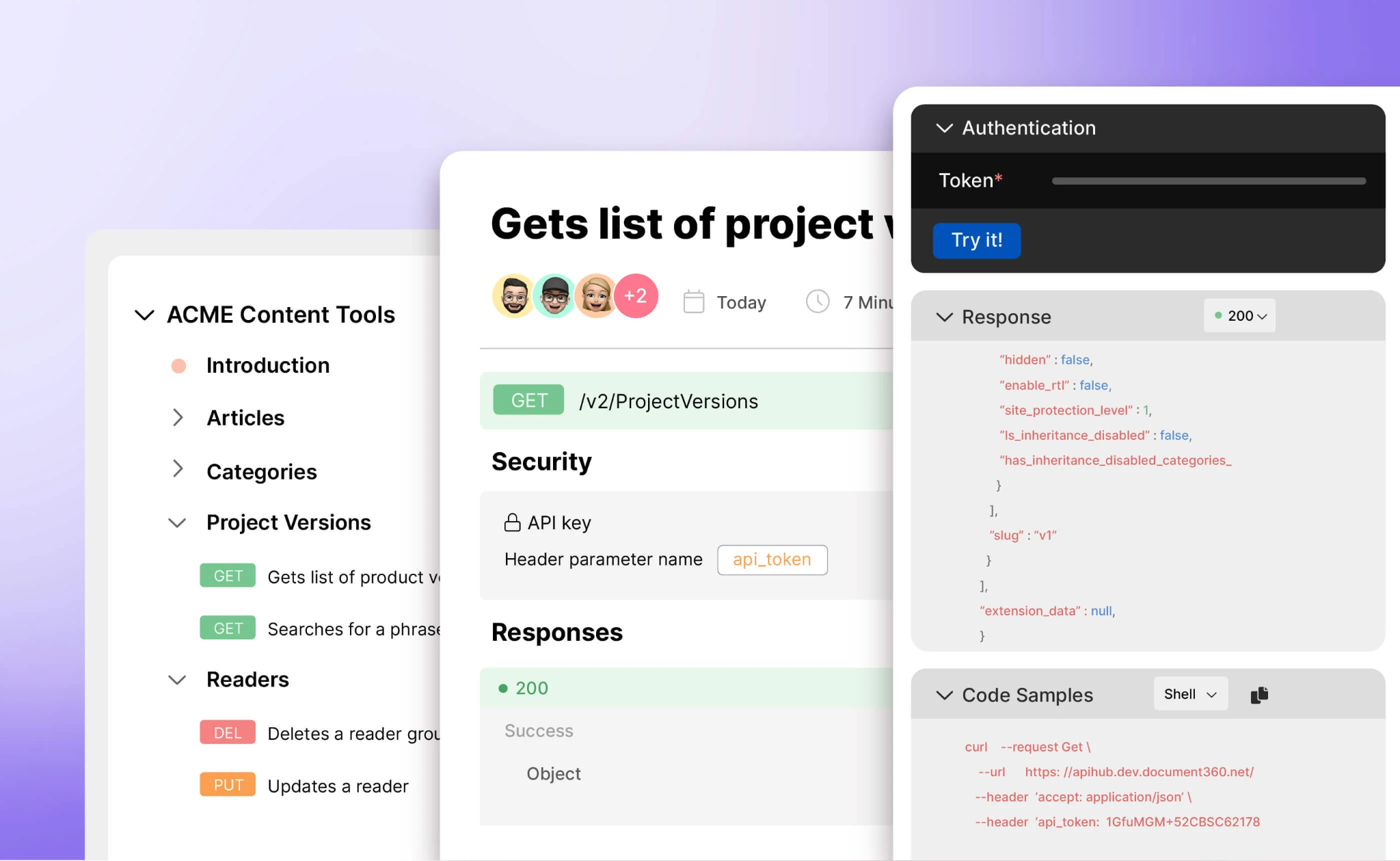
At its core, the feature takes an OpenAPI spec and turns it into a browsable, testable reference site. You give it a spec, and it reads the paths, parameters, schemas, and security definitions to build pages out of them. From there you get three things plain documentation can’t offer on its own: structured endpoint navigation, live request testing, and a way to keep everything updated when the spec changes without starting over.
That last part matters more than it sounds. Anyone who has maintained API docs manually knows the real cost isn’t writing the first version. It’s the second month, when three endpoints changed, and nobody remembers to update the docs until a support ticket comes in.
How to Import Your API
Upload, URL, or CI/CD
There are three ways to get a spec into Document360:
- Upload a JSON or YAML file from your machine or from Document360 Drive.
- Point to a spec hosted at a URL (for example, a published Swagger/OpenAPI endpoint), which is useful if your team already publishes the spec somewhere internally.
- Wire it up through a CI/CD flow using the
d360CLI (which requires Node.js), so the reference updates automatically whenever the spec changes in your pipeline.
Document360 supports OpenAPI 2.0, 3.0, and 3.1, and Postman Collections are supported alongside them.
The CI/CD route is the one that actually solves the staleness problem, because it’s the only method that resyncs on its own. File and URL imports have to be resynced by hand in the portal, which means someone still has to remember to trigger an update. The pipeline integration removes that step entirely: if your team merges a spec change and the pipeline runs, the docs reflect it without manual intervention.
If you want to try the feature before committing a real spec to it, there’s a sample Petstore API file available inside the platform. It’s the same Petstore example most API tooling uses for demos, so if you’ve worked with Swagger or Postman before, it’ll look familiar. It’s a reasonable way to explore the import process and the Try It console without risking your production spec.
Organizing Endpoints
Specs with more than a handful of endpoints get messy fast if there’s no way to group them. Document360 handles this through OpenAPI tags. If you write a tag like "Pets > Details", the reference will nest "Details" under a "Pets" category in the sidebar navigation, rather than dumping every endpoint into one long flat list. Nesting goes to a maximum of three levels, and anything deeper is placed at the third level.
The part worth knowing is that this nesting survives a resync. Some tools rebuild their navigation from scratch every time you re-import a spec, which means any manual reorganizing you did gets wiped out. Here, as long as the tag structure in your spec stays consistent, the hierarchy holds even after updates.
When an updated spec removes endpoints that existed in the previous version, Document360 flags them before the import. You click Show deleted endpoints to review them and check Confirm to continue to proceed. Deleted endpoints can be previewed in the recycle bin for 30 days but can’t be restored, and any custom content added to them is permanently lost.
This matters more as a spec grows. A spec with sixty or seventy endpoints, which isn’t unusual for a mature product, gets genuinely hard to navigate if the categories don’t map to how developers actually think about the API. Document360 doesn’t enforce a particular grouping strategy here — it respects whatever tag hierarchy you define in the spec, so the responsibility falls on whoever owns the spec to think about navigation the same way they’d think about the structure of a regular knowledge base, not just as metadata attached to each endpoint.
Once your spec is imported and organized, publishing is simple: set visibility, decide whether the reference is public or gated behind authentication, and push it live.
See it in action: Check out this video on how Document360’s API documentation feature works:
Testing Endpoints With the Try It Console
This is the feature that separates an API reference from a plain document describing an API. The Try It console lets a developer send an actual request to your API and see the actual response, without leaving the documentation page — no copying curl commands into a terminal, and no switching to Postman to check whether a parameter is required.
Getting Try It Working
For this to work, your OpenAPI spec needs a properly defined servers section. This is the single most common reason the Try It button doesn’t show up when people expect it to. If the spec is missing that section, or it’s misconfigured, Document360 has nowhere to send the request, so the console simply doesn’t appear. If you’re setting this up and wondering why Try It isn’t showing on an endpoint, check the servers block in the spec before troubleshooting anything else.
Authentication Support
Try It only works if authentication is both defined in the spec and configured inside Document360. The platform covers the common cases: basic authentication, bearer tokens, API keys, OAuth2 across its usual flows, and OpenID Connect.
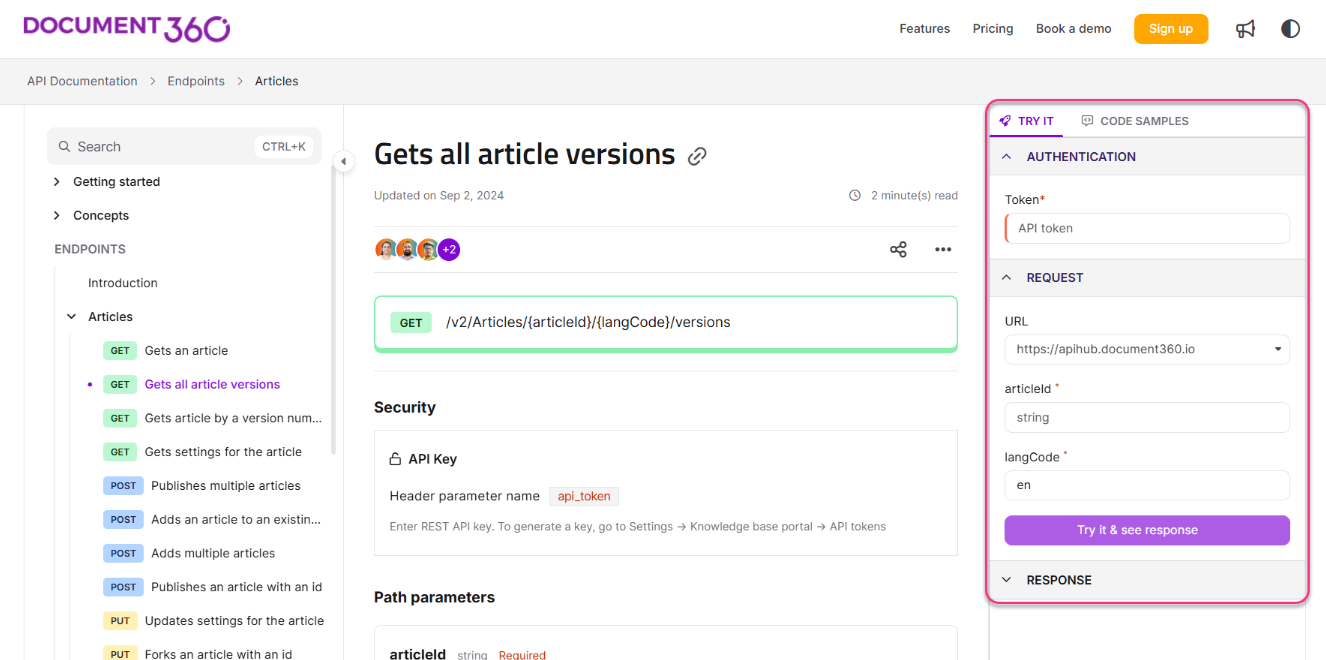
One small but genuinely useful detail: OAuth2 and OIDC sessions refresh automatically in the background during a Try It session. Anyone who has dealt with a token expiring mid-demo knows why this matters — you don’t want to be explaining an endpoint to a stakeholder and have the request fail because a token timed out three minutes ago.
Documenting Webhooks
Most API documentation tools are built around request and response pairs, which works fine for standard REST endpoints but doesn’t map cleanly onto webhooks. A webhook isn’t something a developer calls; it’s something your service calls out to them.
If your OpenAPI spec is written in version 3.1 and includes webhook definitions, Document360 picks those up during import and marks each one with its own icon in the reference, alongside the payload schema and an example. If your spec doesn’t include an example payload, Document360 fills in a default one so the page isn’t left blank.
The one gap worth knowing about going in: the Try It console doesn’t work on webhooks. That makes sense once you consider what a webhook actually is — there’s no endpoint on your side to send a test request to. A developer reading the docs can see exactly what payload your service will send them and build their receiver against it, but they can’t fire a live test the way they can with a regular endpoint. If your team ships a public API alongside webhook notifications, this gives you a place to document the payload contract without inventing a separate page structure for it, even if it’s a lighter form of documentation than what a regular endpoint receives.
Keeping Your API Docs Up to Date
Resync and Update
When your spec changes, you don’t have to rebuild the reference. Resync pulls in the changes from an updated file or URL and merges them into the existing reference. New endpoints get added, changed parameters get updated, and removed endpoints disappear.
Worth knowing before you rely on this heavily: any custom content you add to endpoint articles is retained when you resync. Only the spec-generated content is updated. If you’ve added usage notes, a code example, or extra context to an endpoint page, that stays. Parameters, schemas, and descriptions that come from the spec are refreshed to match the latest file.
Versioning and Logs
Versioning in Document360 works at the workspace level rather than as a toggle inside a single API reference. If you’re supporting more than one live API release at a time — which is standard for teams with mature products — the way to handle it is to keep a separate workspace for each major version, the same way you would for v1 and v2 of a regular knowledge base. Developers on an older integration land in the workspace built for that version; developers building something new get pointed to the newer one. It’s a workable setup, but it’s worth knowing upfront that it’s a project-level structure you set up yourself, not a version switcher built into a single reference page.
Change logs track who edited what and when. For a solo maintainer, this is nice to have. For a team with several contributors touching the same reference, it’s essential. Knowing that someone changed an authentication requirement last Tuesday, and being able to see exactly what changed, saves considerable guessing when something breaks downstream.
How Editing and Workspaces Work
How Editing Works
Endpoint content in Document360 has two layers. The spec-generated layer (parameters, schemas, descriptions from the OpenAPI file) comes from your spec and is updated by editing the source file and resyncing. On top of that, you can add your own content to any endpoint page (usage notes, code samples, images, context the spec doesn’t capture) using the built-in editor. That custom layer is kept when you resync, so writers can enrich the reference without touching YAML, while engineers keep the spec as the source of truth.
This split is deliberate. Building a full graphical editor for OpenAPI YAML — one that lets you edit every field without breaking the spec’s structure — is a much harder problem than it sounds, and most tools that attempt it end up with an editing experience that is clunky at best. Keeping spec-generated fields tied to the file avoids that entirely. The tradeoff is that changes to parameters, schemas, or spec descriptions need someone comfortable editing YAML or JSON directly. Everything else on the page can be handled by writers in the editor.
Reader Access and Privacy
Access to the API reference can be configured separately from the rest of your knowledge base. There are three access options — Private, Public, and Mixed — managed under Settings > Users & Permissions. You can require a login for the API docs while keeping your general documentation public, or the reverse, depending on what makes sense for your product.
Workspace Architecture
Your API documentation lives in its own workspace, separate from your standard knowledge base. That separation covers reader access settings, URL routing, and its default path, which is /apidocs unless you change it. It also gets its own place in your project’s overall structure.
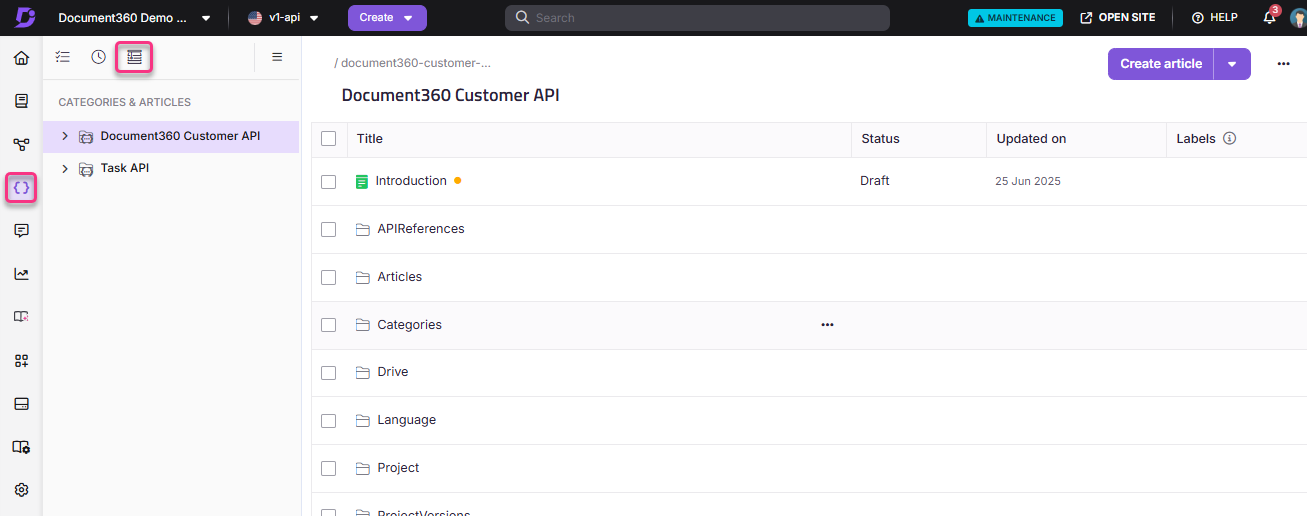
You can still link back and forth between conceptual articles and specific endpoints, so a guide explaining how authentication works can point directly to the auth endpoint reference. But the two aren’t forced to share the same navigation menu or the same permission rules.
In practice, this opens up configurations that are genuinely useful:
- You can publish your conceptual docs publicly while keeping the API reference behind a login (common for APIs restricted to paying customers).
- The API reference and your knowledge base stay on the same domain/subdomain, separated cleanly by URL slug.
- You can publish up to three separate API references from one workspace, each with its own visibility settings.
If you’ve ever had API documentation get buried three levels deep in a knowledge base’s navigation, or needed stricter access control on the API reference than on everything else, this workspace separation is the mechanism that solves it.
Strengths and Limitations
Pulling this together, the value of Document360’s API documentation module isn’t any single feature — it’s that spec import, endpoint testing, resync, and workspace separation are integrated into one connected platform rather than several disparate tools bolted together. A team can import a spec, test it live through the Try It console, keep it updated automatically through CI/CD, and set up separate workspaces for different API versions, all without juggling multiple vendor logins.
However, there are clear limitations worth being upfront about:
- Spec fields are read-only in the portal: Spec-generated fields cannot be edited via a GUI in Document360. Parameters, schemas, and endpoint descriptions come from the OpenAPI file, and the file is what you must edit upstream. Writers can enrich pages with narrative notes and examples, but schema modifications require someone comfortable editing OpenAPI files.
- No Try It for webhooks: Webhook contracts can be documented from OpenAPI 3.1 specs, but cannot be invoked interactively.
- Workspace-level versioning: Versioning requires configuring separate project workspaces rather than clicking an in-page version dropdown.
Who Should Use Document360 for API Docs
This feature fits teams that want their API reference and their regular product documentation living in one platform, and who are willing to treat the OpenAPI spec as the actual source of truth rather than something to work around. If that description matches how your team operates, the combination of automatic sync, live testing, and separate workspace controls covers most of what an API documentation setup needs to do.
If your team wants to edit spec-level fields in a visual GUI, or doesn’t maintain an OpenAPI spec or Postman Collection, this module isn’t going to be the right fit (though Document360’s general knowledge base tools would still apply to your conceptual docs). Similarly, if you require completely bespoke, highly customized API reference styling, you should evaluate dedicated spec-first tools against clear expectations regarding Document360’s customization ceiling.
Sponsored
About Tom Johnson

I'm an API technical writer based in the Seattle area. On this blog, I write about topics related to technical writing and communication — such as software documentation, API documentation, AI, information architecture, content strategy, writing processes, plain language, tech comm careers, and more. Check out my API documentation course if you're looking for more info about documenting APIs. Or see my posts on AI and AI course section for more on the latest in AI and tech comm.
If you're a technical writer and want to keep on top of the latest trends in the tech comm, be sure to subscribe to email updates below. You can also learn more about me or contact me. Finally, note that the opinions I express on my blog are my own points of view, not that of my employer.